
'DeclarationPublic Class StockSeries Inherits Series
'UsageDim instance As StockSeries
public class StockSeries : Series
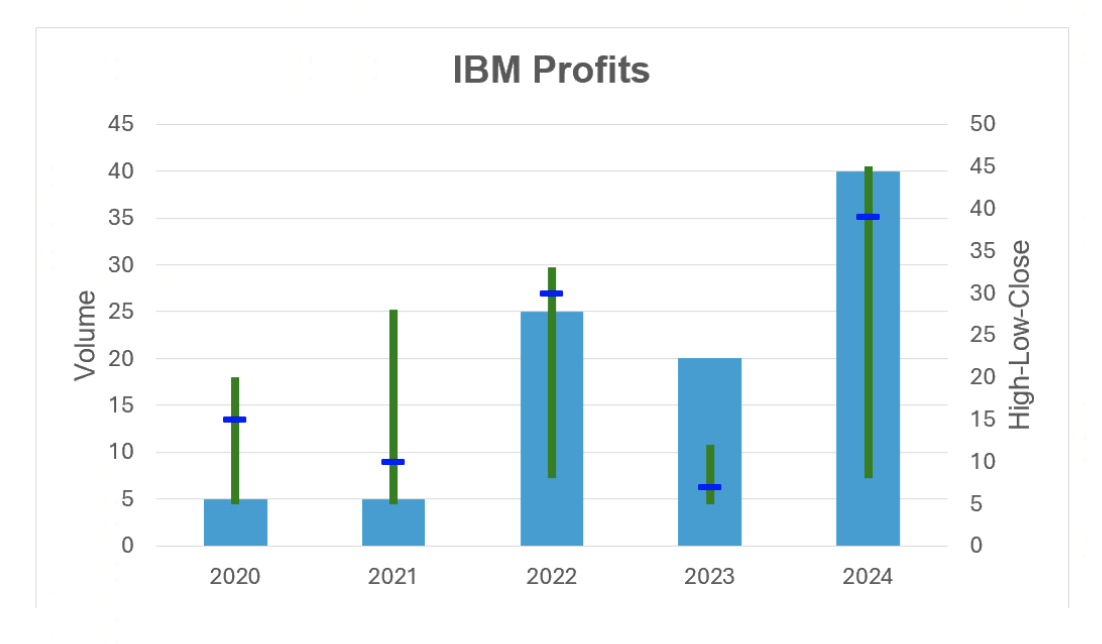
The code below would display the following Chart:
var workbook = Workbook.Create( ChartSample.ChartSampleOutputDirectory + @"AddCharts.xlsx" );

// Gets the first Worksheet. A Workbook always contains at least 1 Worksheet.
var worksheet = workbook.Worksheets[ 0 ];

// Adds Values for Category.
worksheet.Cells[ "B4" ].Value = 2020;
worksheet.Cells[ "B5" ].Value = 2021;
worksheet.Cells[ "B6" ].Value = 2022;
worksheet.Cells[ "B7" ].Value = 2023;
worksheet.Cells[ "B8" ].Value = 2024;

// Adds Values for Series.
worksheet.Cells[ "C4" ].Value = 20;
worksheet.Cells[ "C5" ].Value = 28;
worksheet.Cells[ "C6" ].Value = 33;
worksheet.Cells[ "C7" ].Value = 12;
worksheet.Cells[ "C8" ].Value = 45;

// Adds a StockChart with the generic Add method and sets its SubType. The size of the Chart will be from Cell E4 to L18.
var stockChart = worksheet.Charts.Add<StockChart>( "E4", "L18" );
stockChart.SubType = StockChartSubType.VolumeHighLowClose;

// Sets the Chart's title.
stockChart.Title.Text = "IBM Profits";
stockChart.Title.TextOptions.Font.Bold = true;

// Sets the Category data(x values) for the StockChart : Cells B4 to B8.
stockChart.CategoryData = CategoryData.FromCells( worksheet, "B4", "B8" );

// Sets a Title for ValueAxis and SecondaryAxis and make those Titles visible.
stockChart.ValueAxis.Title.Text = "Volume";
stockChart.ValueAxis.Title.IsVisible = true;
stockChart.SecondaryValueAxis.Title.Text = "High-Low-Close";
stockChart.SecondaryValueAxis.Title.IsVisible = true;

// Customizes the HiLowLine.
stockChart.HighLowLines.Width = 3;
stockChart.HighLowLines.Color = Xceed.Drawing.Color.Green;

// Adds StockSeries & ColumnSeries to the StockChart (y values) by specifying fixed values and a range of Cells’ Adresses.
var volumeSeries = stockChart.SeriesCollection.AddFromValues<ColumnSeries>( 5, 5, 25, 20, 40 );
var highSeries = stockChart.SeriesCollection.AddFromCells<StockSeries>( "C4", "C8" );
var lowSeries = stockChart.SeriesCollection.AddFromValues<StockSeries>( 5, 5, 8, 5, 8 );
var closeSeries = stockChart.SeriesCollection.AddFromValues<StockSeries>( 15, 10, 30, 7, 39 );

// Customizes the CloseSeries to better see the DataPoints.
closeSeries.Marker.Size = 8;
closeSeries.Marker.Symbol = MarkerSymbol.Dash;
closeSeries.Marker.Border.Color = Xceed.Drawing.Color.Blue;
closeSeries.Marker.Fill.Color = Xceed.Drawing.Color.Blue;

// Saves Workbook to disk.
workbook.Save();
System.Object
Xceed.Workbooks.NET.WorkbookElement
Xceed.Workbooks.NET.WorksheetElement
Xceed.Workbooks.NET.ChartValueRange
Xceed.Workbooks.NET.Series
Xceed.Workbooks.NET.StockSeries
| Name | Description | |
|---|---|---|
 | StockSeries Constructor | Creates a StrokesSeries in the Chart. |
| Name | Description | |
|---|---|---|
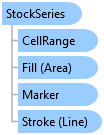
 | CellRange | Gets the CellRange associated with the ChartValueRange. (Inherited from Xceed.Workbooks.NET.ChartValueRange) |
| DataPointLabels | Gets the StockSeries' data labels. |
| Fill | Gets the Area that will be filled with a color. (Inherited from Xceed.Workbooks.NET.Series) |
| Marker | Gets the StockSeries' Markers. |
| Name | Gets or sets the Series' name. (Inherited from Xceed.Workbooks.NET.Series) |
| PlotOnSecondaryAxis | Gets or sets if the Series is plotted on the secondary Axis. (Inherited from Xceed.Workbooks.NET.Series) |
| Stroke | Gets the Line associated with the Series. (Inherited from Xceed.Workbooks.NET.Series) |
| Values | Gets or sets the values associated with the ChartValueRange. (Inherited from Xceed.Workbooks.NET.ChartValueRange) |
.NET: net5.0, net5.0-windows, net6.0, net6.0-macos, net6.0-windows, net7.0, net7.0-macos, net7.0-windows, net8.0, net8.0-browser, net8.0-macos, net8.0-windows, net9.0, net9.0-browser, net9.0-macos, net9.0-windows, net10.0, net10.0-browser, net10.0-macos, net10.0-windows.
.NET Framework: net40, net403, net45, net451, net452, net46, net461, net462, net463, net47, net471, net472, net48, net481.