NuGet is a popular package manager used for packaging and distributing software written for .NET and the .NET Framework.
Each Xceed component is made up of several individual assemblies (.dll) that work together to provide all the functionality.
For ease of use, Xceed NuGet packages are organized into meta-packages. These are NuGet packages that don't have content of their own, but reference other packages. These meta-packages represent the collection of assemblies that make up a single component.
To use a component using NuGet as the source, pick a component from the table below. The Component column is the marketing name of the component. The NuGet meta-package to use is the name that must be searched for in the NuGet repository. The Effective packages referenced shows what the meta-package actually installs.
| Component | NuGet meta-package to use | Effective packages referenced |
|---|---|---|
| Xceed Zip for .NET | Xceed.Products.Zip.Full | Xceed.Compression Xceed.Compression.Formats (optional) Xceed.FileSystem Xceed.FileSystem.Windows (optional. Not used in .NETStandard) Xceed.Zip |
| Xceed SSH/SFtp for .NET | Xceed.Products.SFtp.Full | Xceed.FileSystem Xceed.FileSystem.Windows (optional. Not used in .NETStandard) Xceed.SSH.Client Xceed.SSH.Core Xceed.SSH.Protocols Xceed.SSH.SFtp |
| Xceed FTP for .NET | Xceed.Products.Ftp.Full | Xceed.Compression Xceed.FileSystem Xceed.Ftp |
| Xceed Tar/GZip for .NET | Xceed.Products.Tar.Full | Xceed.Compression Xceed.Compression.Formats Xceed.FileSystem Xceed.FileSystem.Windows (optional. Not used in .NETStandard) Xceed.GZip Xceed.Tar |
| Xceed Real-Time Zip for .NET | Xceed.Products.RealTimeZip.Full | Xceed.Compression Xceed.Compression.Formats (optional) Xceed.FileSystem (optional) Xceed.FileSystem.Windows (optional. Not used in .NETStandard) Xceed.Zip |
The Effective packages referenced are unlisted in NuGet. This means that they will not appear in search results on nuget.org. This is deliberate. It avoids confusion between packages (is the component Xceed.Zip or Xceed.Products.Zip.Full?). This does not mean that the packages are deprecated or have security vulnerabilities. It is possible to use these unlisted packages directly for more control. See the section below for details.
Once the package name has been decided upon, to actually add a meta-package to a .NET application, detailed instructions can be found in the Visual Studio documentation.
But in summary, in Visual Studio, load a project in Solution Explorer, and then select Project > Manage NuGet Packages. The NuGet Package Manager window opens.
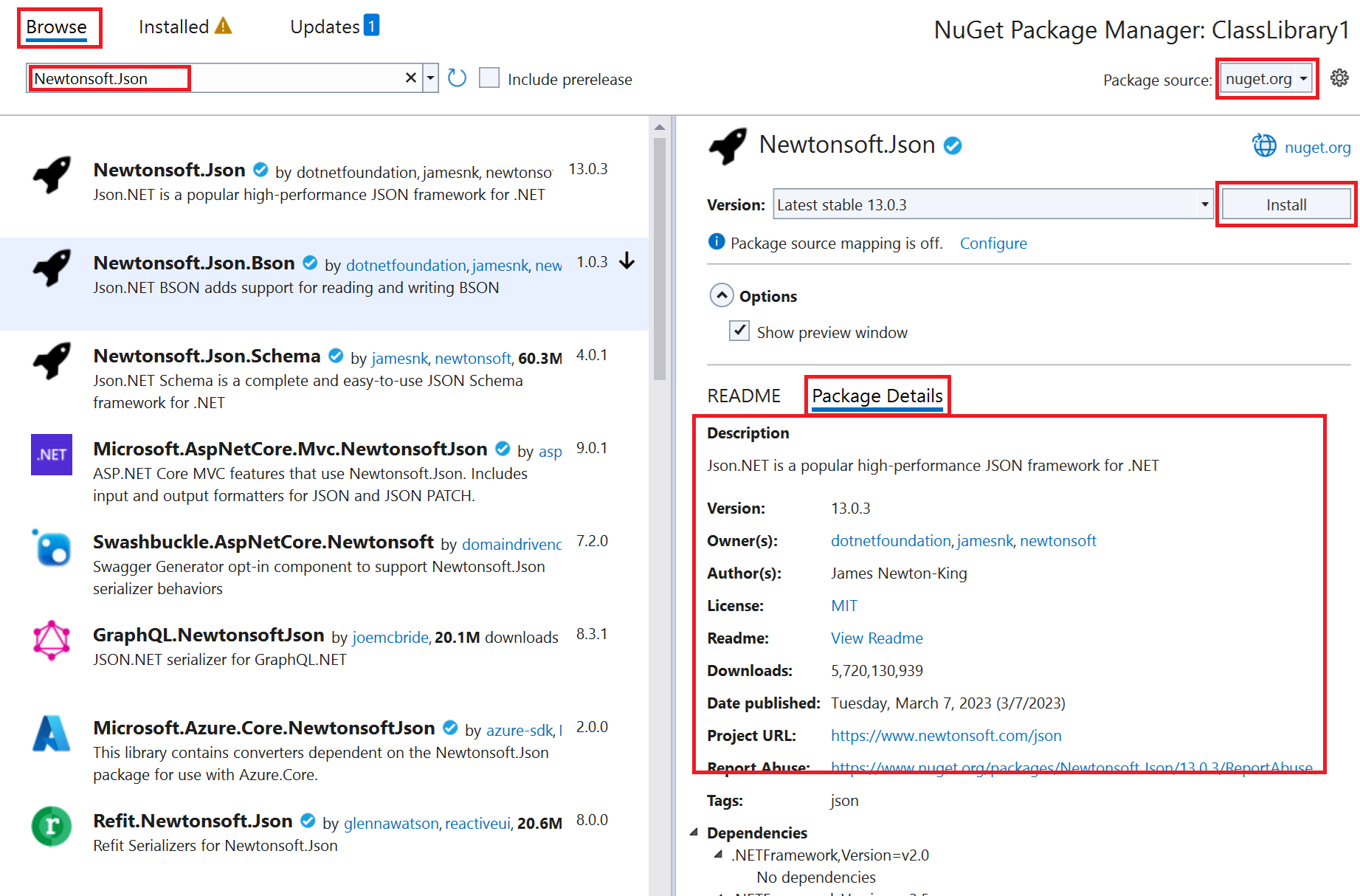
Xceed NuGet packages contain multiple flavors of the same assembly, compiled for different .NET Framework versions. NuGet will automatically select a flavor as a reference based on the target framework of the application. A little control is lost here but this works well in most scenarios.
If NuGet selects a flavor that does not suit your needs, consider downloading the Software Development Kit from the Xceed web site. There you can control exactly what flavor is referenced in your application.
The same application can reference more than one component. Because each package has a unique identifier, NuGet will recognize if Xceed.FileSystem, for example, has already been referenced.
On install, the Xceed meta-packages do
minimum version, inclusive range, which means it accepts any version at the number selected in the package manager and above, resolving to the smallest acceptable stable version. On install, the Xceed meta-packages do not
On restore, the Xceed meta-packages do
packages.config file. On update, the Xceed meta-packages do
While the Xceed meta-packages cover most usage scenarios, it is possible that more control is needed over which assembly is referenced in an application while still using benefitting from the NuGet functionality.
The component to NuGet package table in the above section shows the individual packages that make up a functioning component. This is the information needed to manually add those NuGet packages to an application instead of a single meta-package. The packages noted as optional can be omitted if desired.
Because the effective packages are unlisted, the package manager will not find them. Instead,
Solution Explorer and selecting Edit Project File.
<PackageReference> item for the required package inside a <ItemGroup> </ItemGroup> block. The exact command to add can be found of the PackageReference tab of each package page on the NuGet web site. Each package in the table above is linked to is.
Here are some examples.
| Lean and mean Xceed Zip for .NET |
Copy Code |
|---|---|
<ItemGroup> <PackageReference Include="Xceed.Zip" Version="7.3.25608.7354" /> </ItemGroup> | |
| Xceed Zip for .NET with the optional Xceed.Compression.Formats |
Copy Code |
|---|---|
<ItemGroup> <PackageReference Include="Xceed.Zip" Version="7.3.25608.7354" /> <PackageReference Include="Xceed.Compression.Formats" Version="7.3.25608.7354" /> </ItemGroup> | |
| Lean and mean Xceed SSH/SFtp for .NET |
Copy Code |
|---|---|
<ItemGroup> <PackageReference Include="Xceed.SSH.Client" Version="7.3.25608.7354" /> </ItemGroup> | |
